MCP-Based Deadline Resolution for Maersk Vessels
Model Context Protocol (MCP) is all the rage now, and deservedly so. It has revolutionized the way that Large Language Models (LLMs) can interact with their surroundings and environment. The idea itself is pretty cool- a user describes their need, while the MCP server intelligently figures out the application of pre-defined "tools" to magically solve the problem and get back results that make sense. One of the first MCP applications that truly blew my mind was Claude Desktop commanding Blender through its MCP to build a 3D model in real-time! Truly, what times we are in!
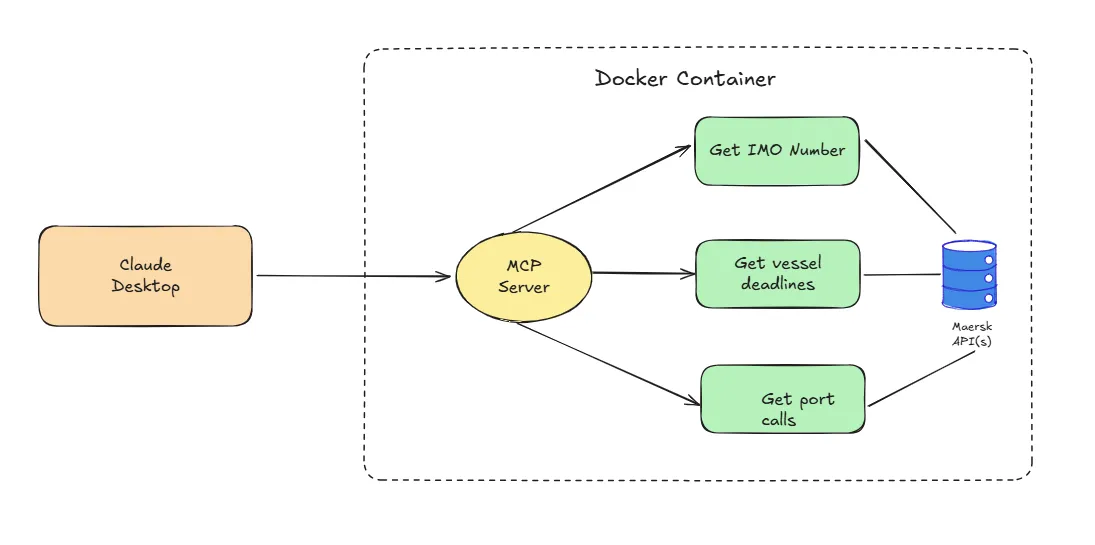
MCP provides a real value addition in how frictionless the user experience can get when it comes to getting complex tasks solved. While toying around, I had the idea of building a MCP interface that can fetch marine vessel data from its biggest player - Maersk - and serve that back to the user, all in a conversational format. This means that the user would not have to leave their host environment (such as Claude Desktop), asking questions at will, while the MCP would determine to use relevant tools at its disposal to answer questions with updated schedule data embedded. At a high-level, this is the flow diagram I used to build the solution.
Navigating the Problem Statement
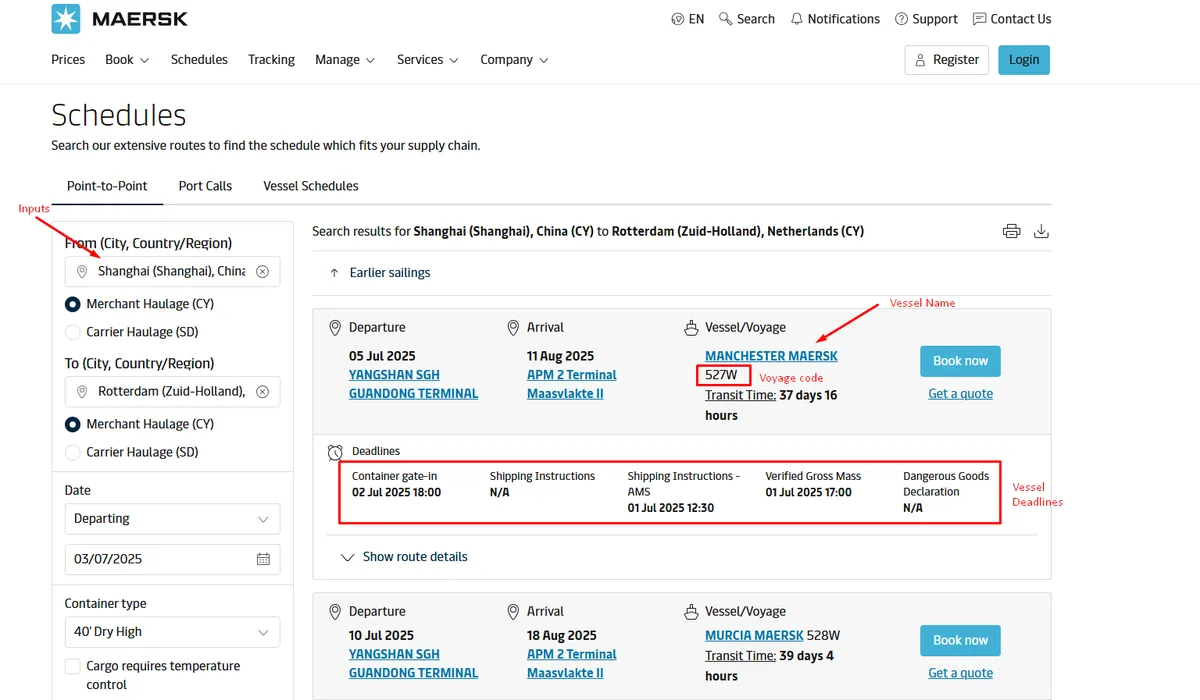
In the shipping industry, each carrier (such as Maersk/MSC, etc.) operate vessels ("ships") that cover multiple ports ("port call") during a transit journey ("voyage"). Thus, it is natural that each vessel will have pre-determined schedules at each port, similar to how trains operate out of stations and flights from their designated airports. However, given that the shipping industry primarily deals with cargo movement ("containers"), there are some deadlines imposed to ensure smooth operations at the port. Simply put, there is a cutoff to when you could last check-in your container to get loaded for a particular vessel ("Commercial Cargo Cut-off"), or for example to submit the gross weight of the container to be loaded ("Verified Gross Mass").
Whew, that was a lot of terminology. I promise they are all relevant to this discourse. Some of this information is available from the Maersk portal. One needs to navigate to their schedules page and fill in information manually onto the form boxes to get vessel schedules and deadlines. This is how the web interface looks like.
Our problem statement is now clear:
Is there a way we can make this entire experience conversational? Is it possible to augment an LLM with updated scheduling data from Maersk?
We will solve for it as per the architecture flow provided above.
Building the Application
To build an MCP server, the de-facto standard is to now rely on the FastMCP library. The library provides an excellent suite of pre-built decorators to assist in setting up the interface. There are generally split into tools, resources and prompts. Think of tools as an extensible utility for the LLM model to use. Web search, for example, is a tool that ChatGPT uses to enhance its information output with latest search results.
We define three tools - one fetches the IMO Number (unique vessel identifier) for a given vessel name (such as "Mumbai Maersk"), another gets vessel deadlines (VGM/SI/Cargo) for the specific vessel + voyage combination, and the other lists all incoming vessels calling a specific port. They work in tandem, supplementing one another.
@app.tool()
async def get_vessel_schedule(
    vessel_imo: Annotated[str, "The IMO number of the vessel"],
    voyage_number: Annotated[str, "The voyage number of the vessel"],
    port_of_loading: Annotated[str, "The port of loading"],
    iso_country_code: Annotated[str, "The ISO country code of the port of loading"],
) -> str:
    """
    Get the schedule of a vessel from the Maersk vessel API, by passing the IMO number, voyage number, port of loading and ISO country code.
    If the vessel IMO is not provided and the name instead, fetch the IMO number using the get_vessel_imo tool and then proceed.
    """
    base_url = f"https://api.maersk.com/shipment-deadlines?ISOCountryCode={iso_country_code}&portOfLoad={port_of_loading}&vesselIMONumber={vessel_imo}&voyage={voyage_number}"

    resp = requests.get(base_url, headers=headers)

    try:
        resp.raise_for_status()
        data = resp.json()
        terminal_name = data[0]["shipmentDeadlines"]["terminalName"]
        deadlines_joined = ", ".join(f'{deadline["deadlineName"]} on {deadline["deadlineLocal"]}' for deadline in data[0]["shipmentDeadlines"]["deadlines"])

        return f"The vessel {vessel_imo} is scheduled to arrive at {terminal_name} with deadlines: {deadlines_joined}."

    except requests.exceptions.RequestException as e:
        return f"Error: {e}"
Similarly, we define the other tools with required annotations.
Nuggets on Distribution
It is not enough to build the server and test it out on my local PC. For production use cases, we often look to isolate the solution into a "container", which houses all dependencies necessary for the application to run. To do so, we first build the application image, and subsequently push it to an image repository, such as the Docker Hub. However, before we push it to the repository, we need to "tag" it with the repository locator. The commands are shown below.
docker build -t maersk-mcp:v1 . # Build the Docker image
docker tag maersk-mcp:v1 dipankan001/maersk-mcp:v1 # Tag the image
docker push dipankan001/maersk-mcp:v1 # Push the image to the Docker Hub
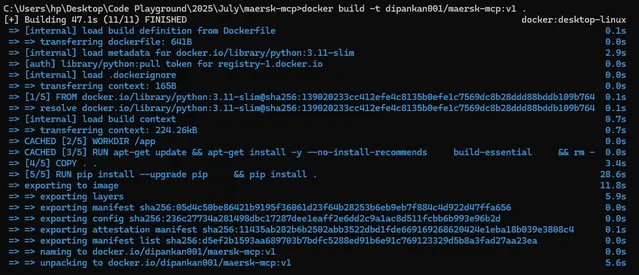
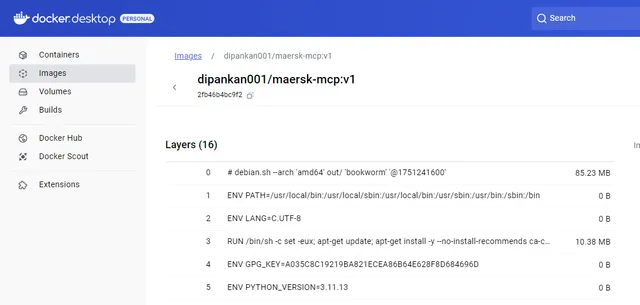
Once the image is built and pushed to the hub, it will appear as presented below.
Our final step is to expose the application to our host, which in our case is Claude Desktop. To add this MCP, we need to edit its configuration file and append the below code. Ensure that you have an API key for this to work. Maersk API keys are available from their developer portal.
{
  "mcpServers": {
    "maersk-mcp-server": {
      "command": "docker",
      "args": ["run", "--rm", "-i", "-e", "CONSUMER_KEY=<INSERT_API_KEY_HERE>", "dipankan001/maersk-mcp:v1"]
    }
  }
}
Voila! Now it is time for the magic to work!
What Have We Cooked?
We will start with an elementary question, and then gradually notch up the complexity of requests. I will explain the decisions being made implicitly by the model and its employment of tools.
As you may recall, we have a basic tool to obtain a unique Vessel Identifier (IMO Number) given a vessel name. Let's try it out for Manchester Maersk.
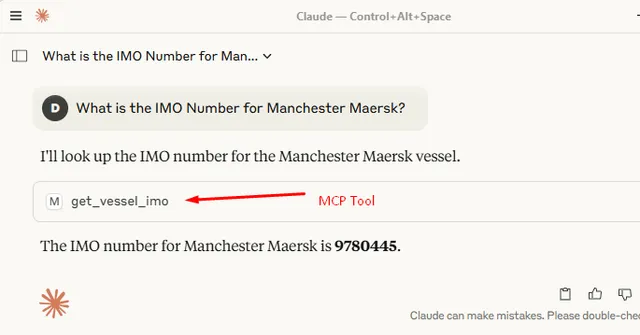
That was an easy pie! Let's step up the gas. I will ask for all vessels calling Shanghai port in the next one week and subsequently ask for its shipping deadlines. The complexity is that to get shipping deadlines, you mandatorily need the IMO number, the voyage code, the port of load and the country code. The beauty of using MCP is that they will auto-resolve the dependencies. Meaning - when data is not provided, it will either try to infer, OR utilise other tools at its disposal to get to the end results. Here we go:
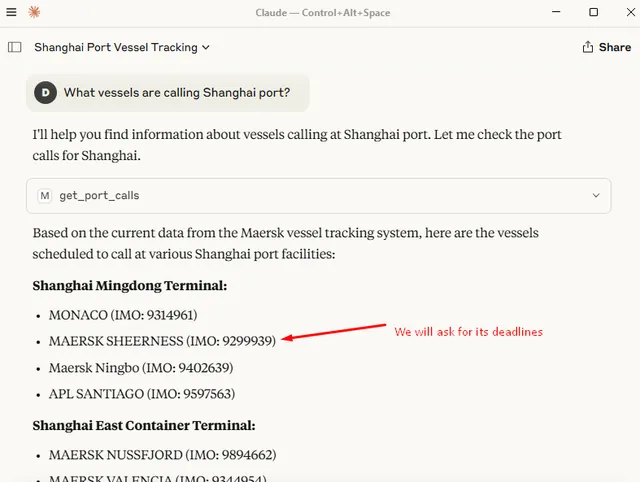
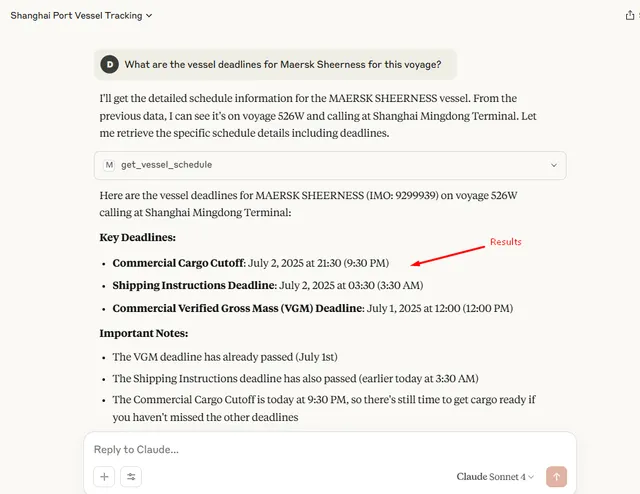
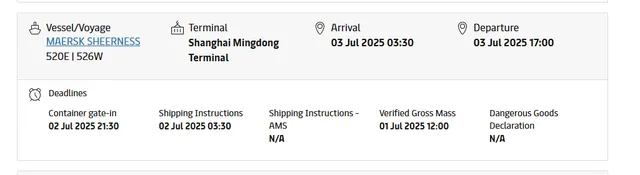
And just to be doubly sure - as always - these are the results from the official web portal, exactly accurate to what our MCP tool answered.
Takeaways and beyond
I personally believe that we are only scratching the surface as far as MCPs are concerned; and that the potential is truly limitless. The more interaction(s) we are able to define via method-based tooling, the more control can be provided to the end user to get tasks done autonomously and smoothly. MCP goes hand-in-hand with agentic frameworks that seek to solve tasks with a similar intent, albeit with some operational differences. Google's own Agent2Agent (A2A) protocol complements the MCP.
This post was only to detail my observations, and joys, of building my first MCP server. I've open sourced the code and the details are available in my GitHub repository. Build away!