Bypassing Math CAPTCHAs with GPT Vision Models & Browser Automation
With Agentic AI now pervasive everywhere and frontier AI companies racing to build bigger and better models, the scope of problems that can now be solved is expanding by the minute. This also opens up a lot of security concerns for the legacy "Software 1.0" code - which did not anticipate that problems of moderate complexity would be solved faster than previously conceptualized. One such problem statement is the CAPTCHA codes that are still strewn across the internet. While CAPTCHA itself has evolved over the years, including the likes of Google's 'click-to-verify' model which are harder to spoof, the bulk of the CAPTCHAs being used is still the "image-to-text" model, or to notch it up a little, "math-problem-to-text" patterns. The first one is relatively easier to solve by using Deep Learning based OCR models, and the advanced ones have a fair shot at cracking the distorted characters. However, if the CAPTCHA image is that of a math problem, then it might require reasoning skills to solve the problem after parsing the contents inside.
With the above context in mind, I designed a system that can autonomously bypass Math CAPTCHAs and get to the next step. What happens in the next steps is not of interest; the key concern here is to demonstrate that old CAPTCHA models now are at a serious risk of being bypassed unless supplemented by additional fraud detection models. Below is the proposed architecture.
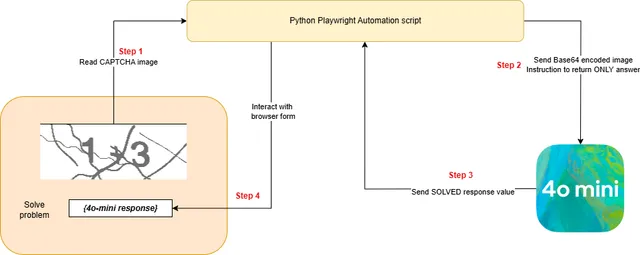
The idea is that once the browser automation agent is able to identify the CAPTCHA image, it takes a screenshot, parses it into a Base64 encoding and sends it over to the vision model (in this case, 4o-mini) to solve. The response is then again handed back over to the browser automation agent to continue with the rest of the steps.
For purposes of practical experimentation and demonstration alone - meaning ONLY with white-hat interests - I picked the Indian Railways Seat Availability tracker as an attack target. The application requires inputs for Train Numbers, Source and Destination stations, Journey Date and the Travel Class (AC/Sleeper). Once you hit the button to 'Get Availability', you are then prompted a CAPTCHA modal to solve a math problem - and if you get past that, BAM! you have the availability data for the next week. The commercial risk is that these APIs are not publicly exposed - and their usage to fetch availability is only let out by the IRCTC on a paid subscription basis. Therefore, any ability to autonomously bypass the portal is a direct revenue leakage for the Indian Railways.
As the task demands browser interaction, I have used the Playwright Python package to interact. An initial one-time setup would involve recognizing the target page layout and noting the identifiers for the form fields to be automated.
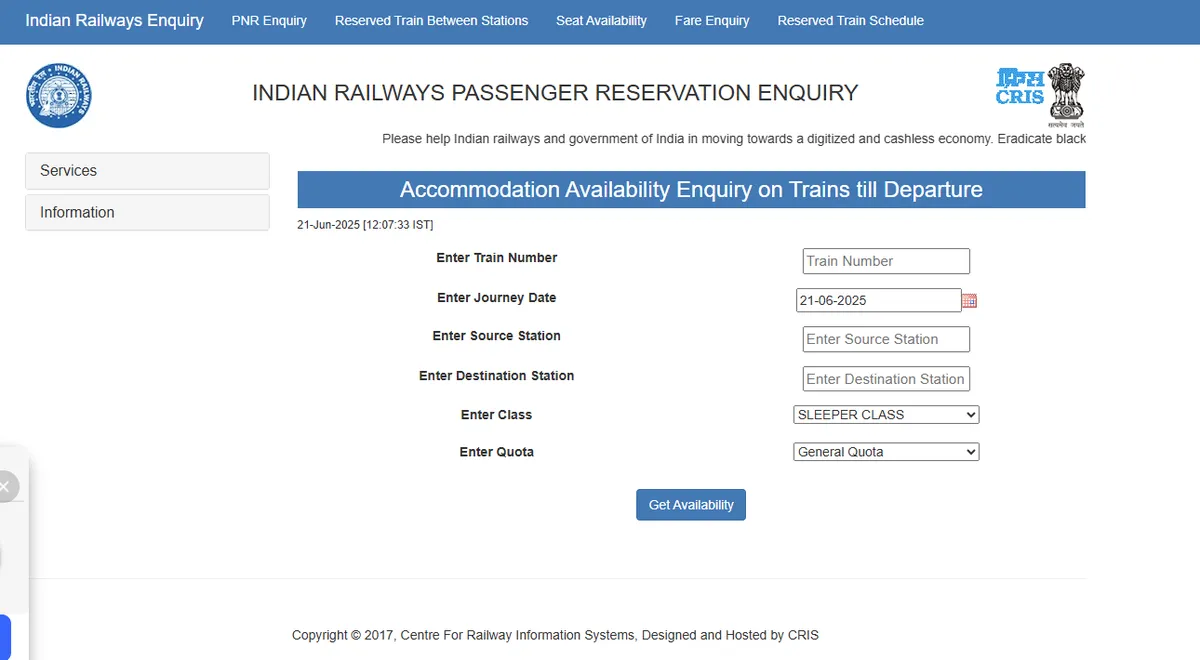
Let us start by automating the form filling. I've taken some sample values for this experiment.
BASE_URL = "https://indianrail.gov.in/enquiry/SEAT/SeatAvailability.html?locale=en2"

async def fill_railway_form():
    async with async_playwright() as p:
        print("Navigating to Indian Railways website...")
        browser = await p.chromium.launch(headless=False)
        page = await browser.new_page()

        try:
            await page.goto(BASE_URL)
            await page.wait_for_load_state("networkidle")

            sample_values = {
                "trainNo": "12345", "dt": "21-06-2025",
                "sourceStation": "HWH", "destinationStation": "GHY",
                "class": "SLEEPER CLASS", "quota": "General Quota"
            }

            print("Filling form fields with sample values...")

            await page.fill("#trainNo", sample_values["trainNo"])
            await page.locator(f"li a:has-text(\"{sample_values['trainNo']}\")").first.click()

            await page.fill("#sourceStation", sample_values["sourceStation"])
            await page.locator(f"li a:has-text(\"{sample_values['sourceStation']}\")").first.click()

            await page.fill("#destinationStation", sample_values["destinationStation"])
            await page.locator(f"li a:has-text(\"{sample_values['destinationStation']}\")").first.click()

            await page.select_option("#class", sample_values["class"])
            await page.select_option("#quota", sample_values["quota"])

            print("All form fields have been filled successfully!")
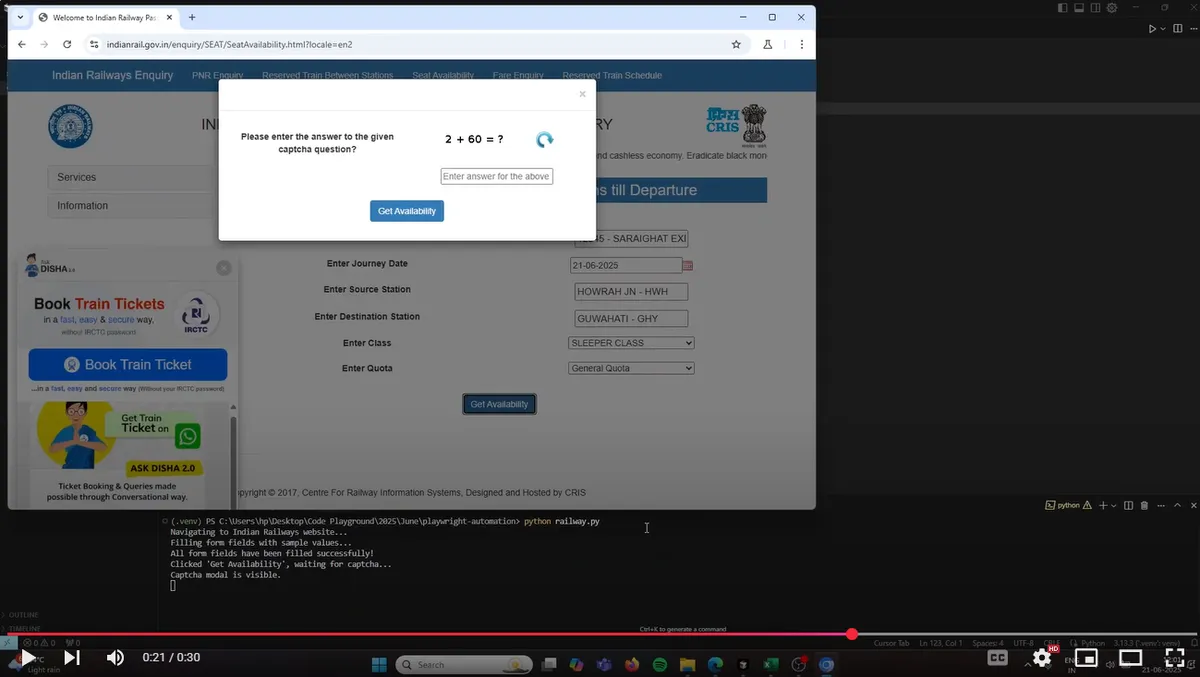
This is how their portal looks like, when the modal dialog pops up. This happens after the program clicks on the 'Get Availability' button once the form is filled.
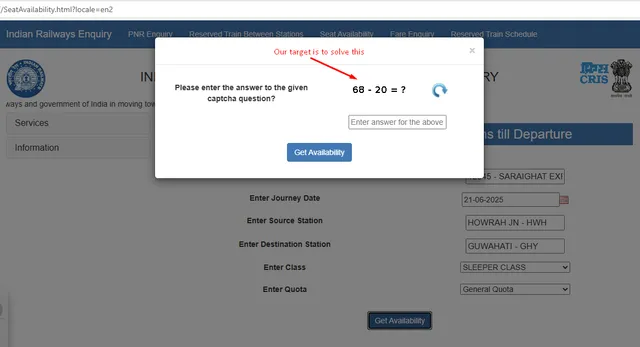
This is where the image capture step is triggered, and subsequently the data is transferred to OpenAI to solve the problem.
image_bytes = await captcha_element.screenshot()
            base64_image = base64.b64encode(image_bytes).decode('utf-8')

            client = AsyncOpenAI()

            try:
                response = await client.chat.completions.create(
                    model="gpt-4o-mini",
                    messages=[
                        {
                            "role": "user",
                            "content": [
                                {"type": "text", "text": "Evaluate the math problem in the image and return only the numerical answer."},
                                {
                                    "type": "image_url",
                                    "image_url": {
                                        "url": f"data:image/png;base64,{base64_image}"
                                    },
                                },
                            ],
                        }
                    ],
                    max_tokens=50,
                )

                answer = response.choices[0].message.content.strip()
Equipped with the answer, the automation agent proceeds to input the CAPTCHA value in the field and then clicks on 'Get Availability' again to validate the input result. As expected, this is correctly solved - and we get through to the end results page, which was our goal!
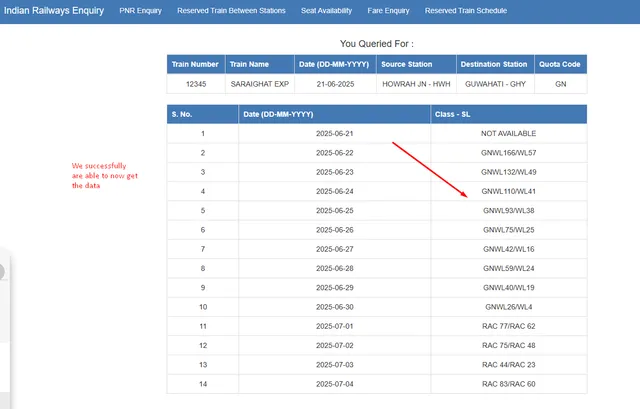
While the blog breaks down the technical approach to solving the CAPTCHA conundrum - I've also captured a screen recording of the process in action. Click on the video below to watch the script autonomously handle the tasks and get the end result.
The implication of the above experiment is that given some data of substantial interest behind a CAPTCHA, that guardrail can now be effectively cracked. With vision models only getting smarter AND cheaper to deploy, mass scraping can now go through by setting these browser agents to operate in a headless manner. The key takeaway is - we need Google's click-to-verify CAPTCHAs now more than ever; every single legacy CAPTCHA is vulnerable to being bypassed with modern techniques.